DJS321 / SYSTEM 01 From browser capture to weekly reflection

Gather the scattered. Make this weekcount.

DJS321 Tabs captures what you find in your browser. DJS321 helps you clarify, plan, focus and reflect. Together, they turn open tabs into a continuous workflow and ideas into action.

01Capture 02Clarify 03Plan 04Focus 05Reflect

Earlier development captures; the released interface may differ.

Real DJS321 Mac week view, with tasks arranged across seven translucent columns
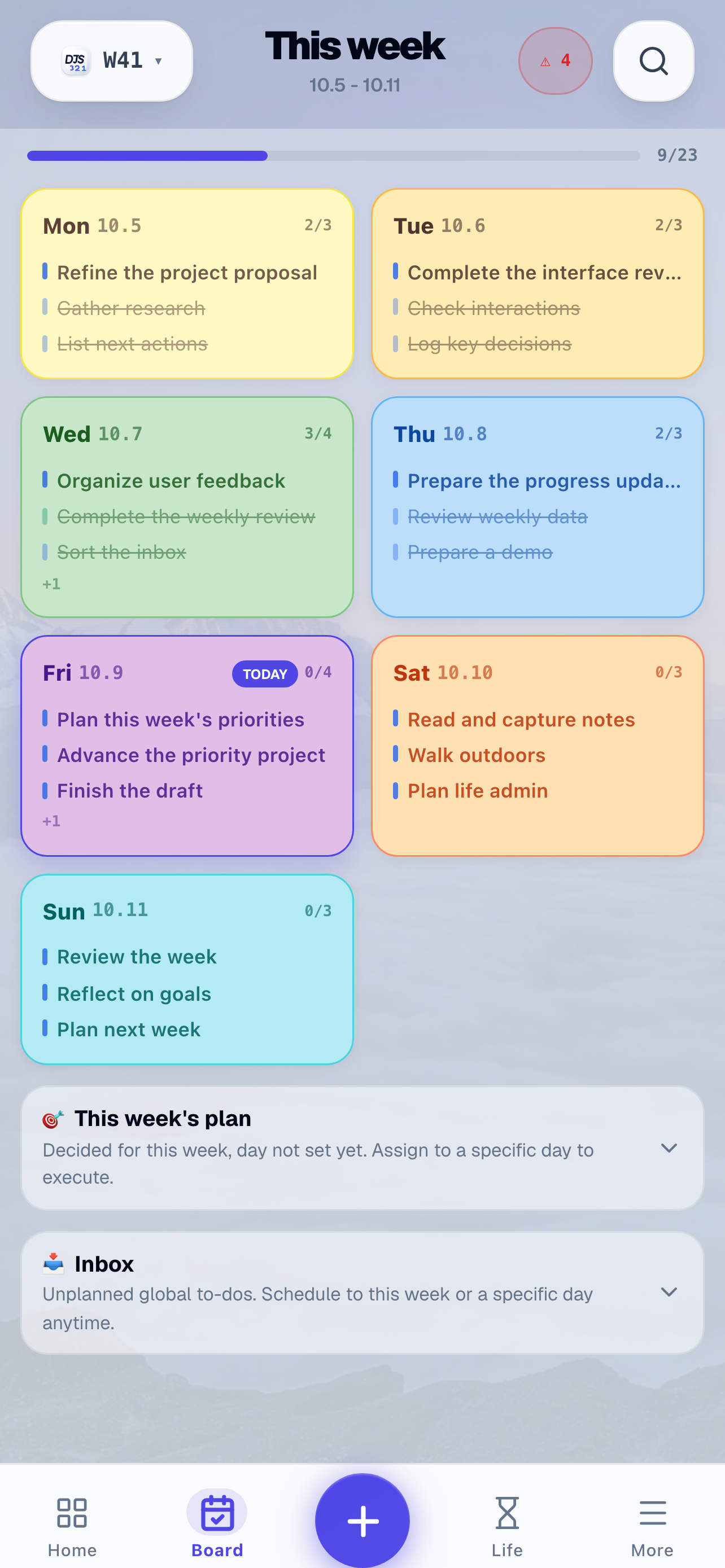
Real DJS321 iPhone week view
One week · One rhythm
macOS / iPhone / iPad
SCROLL TO EXPLORE
01 / THE WEEKLY LOOPFrom an idea to reflection

Planning is not a list.
It is a complete loop.

Capture, clarify, plan, focus and reflect: five actions that shape your next week. DJS321 connects them in a calm, repeatable rhythm.

  1. 01CollectCAPTURE
  2. 02ClarifyCLARIFY
  3. 03PlanPLAN
  4. 04FocusFOCUS
  5. 05ReflectREFLECT
01—03

Capture / Clarify / Plan

Bring everything in.
Then choose your week.

Voice notes, quick captures and web pages go into Inbox first. What matters then earns a place on your seven-day board. Choose where your time goes, rather than filling every slot.

  • One inbox for ideas and useful references
  • Week, quadrant and Gantt views for different decisions
  • Batch scheduling turns goals into dated actions
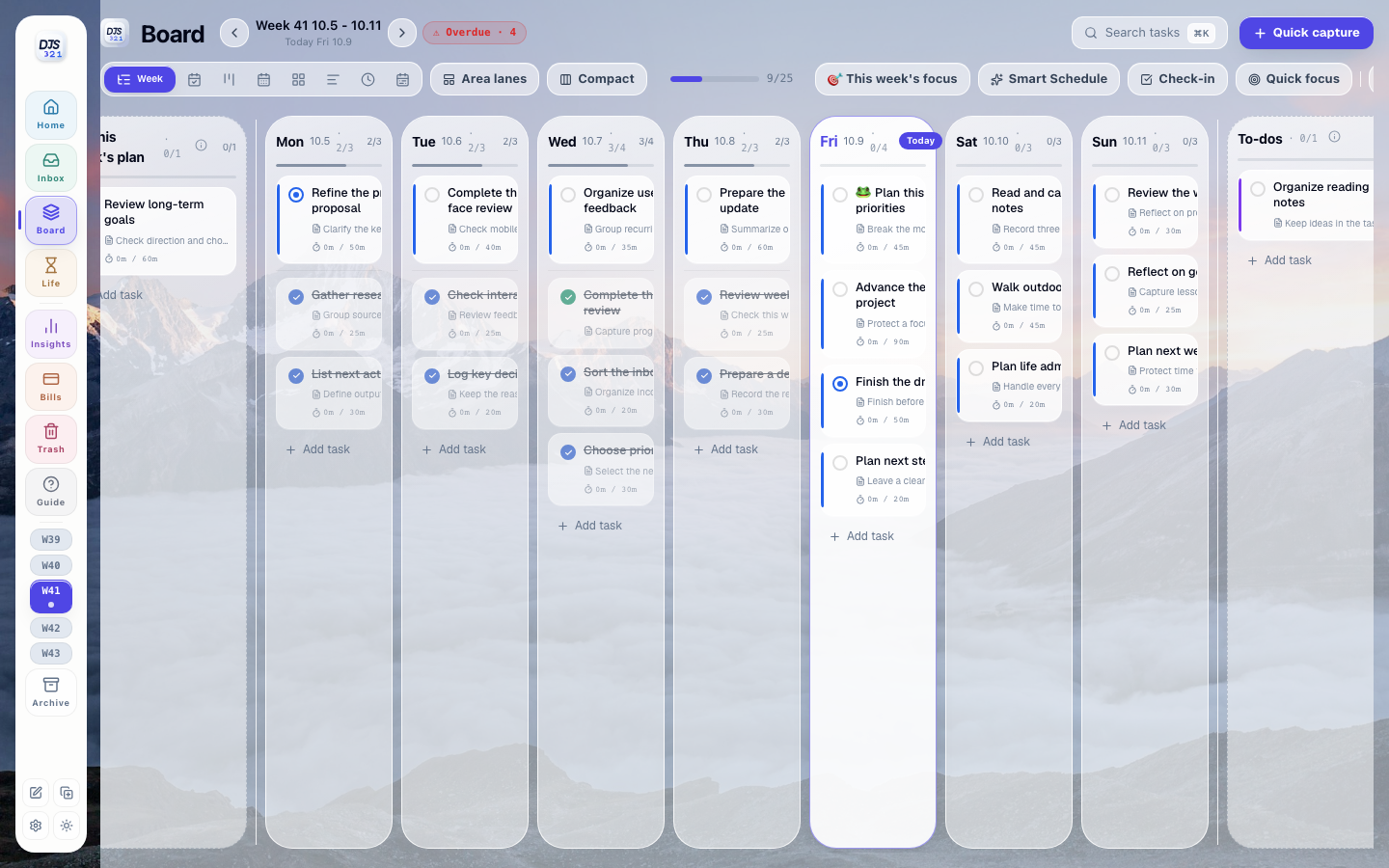
W41 · 10.5—10.11PLAN
Real DJS321 week view, with tasks arranged by day
REAL PRODUCT UI · WEEK VIEW
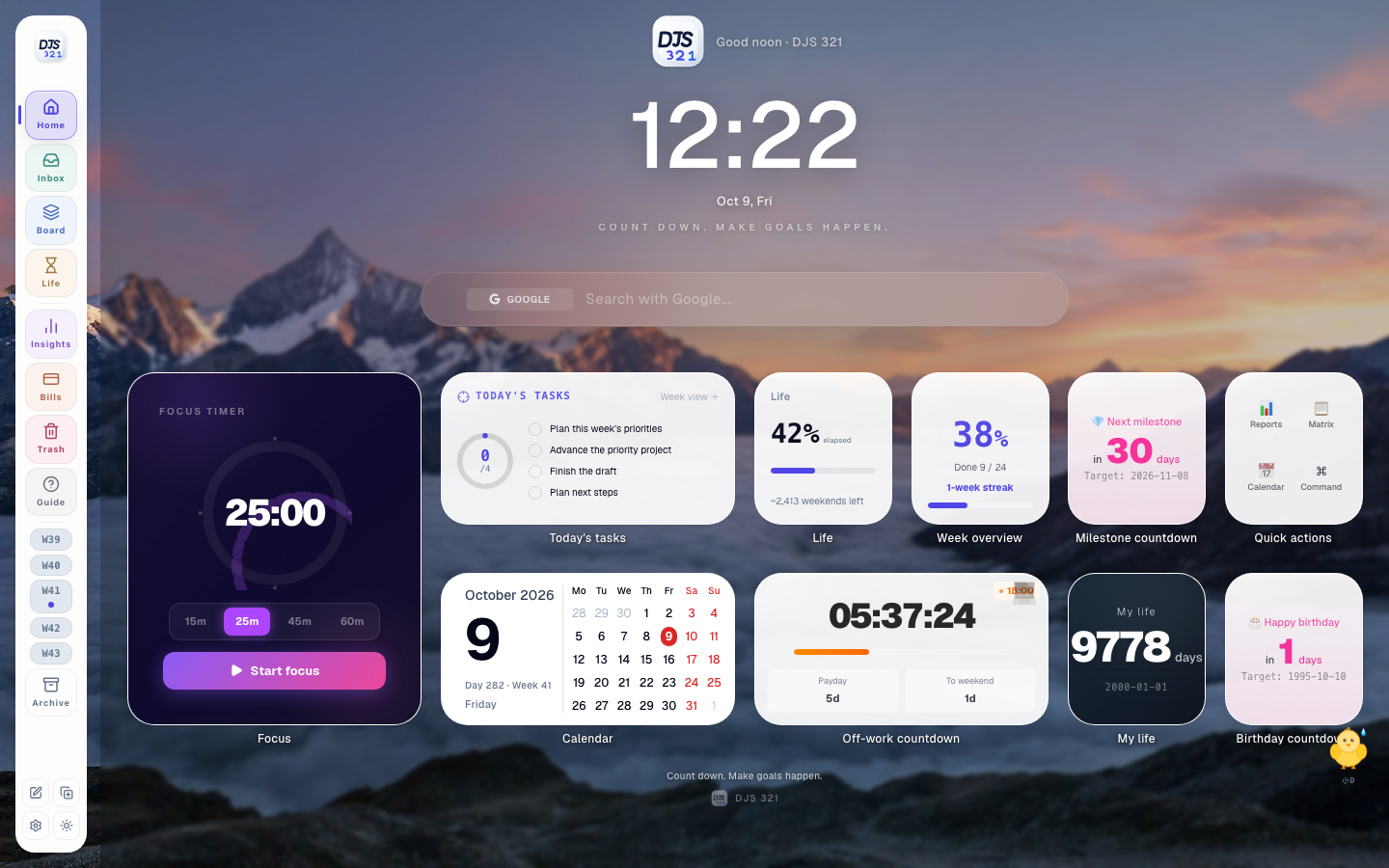
Real DJS321 home screen with weekly overview, today's tasks and a Pomodoro timer
04

Focus / Protect attention

Once the plan is clear,
keep one thing in view.

The Pomodoro timer brings your attention back to now. iPhone widgets and Dynamic Island keep the countdown visible without repeatedly opening the App.

25:00One clear task
One uninterrupted stretch of time
05

Reflect / Learn the pattern

When the week ends,
turn experience into perspective.

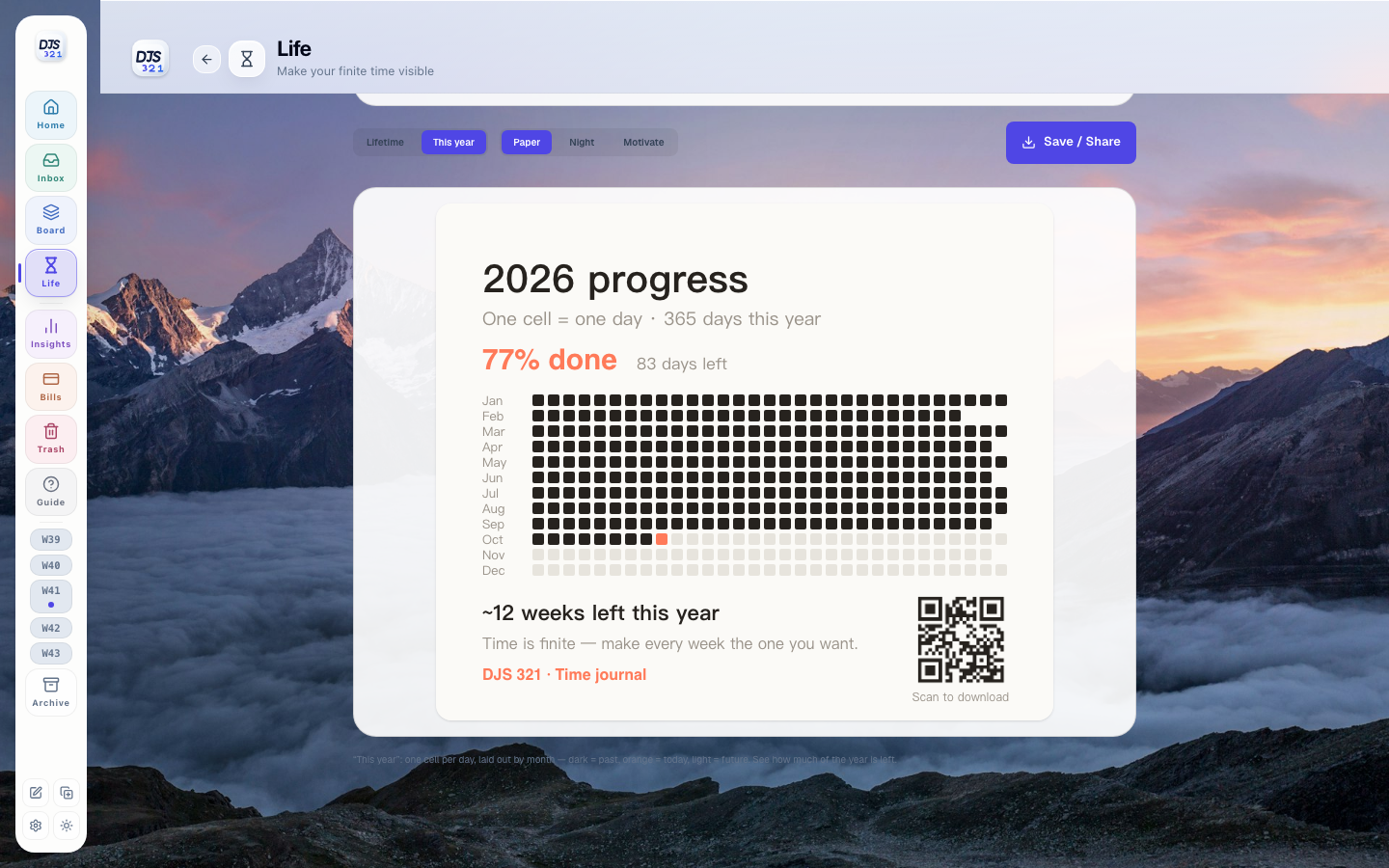
Completion, time invested, habits and your life calendar reveal the gap between intention and reality. Use that evidence to shape the next week.

Weekly reviewInsightsHabit trendsLife calendar
Real DJS321 Time screen, showing time lived and time ahead as a life calendar
4,160 WEEKS · MAKE THEM VISIBLE

The extension captures.
The App helps you decide.

DJS321 Tabs is your browser entry point; DJS321 is where time becomes action. Use either on its own, or hand information over through a local bridge without a product server in between.

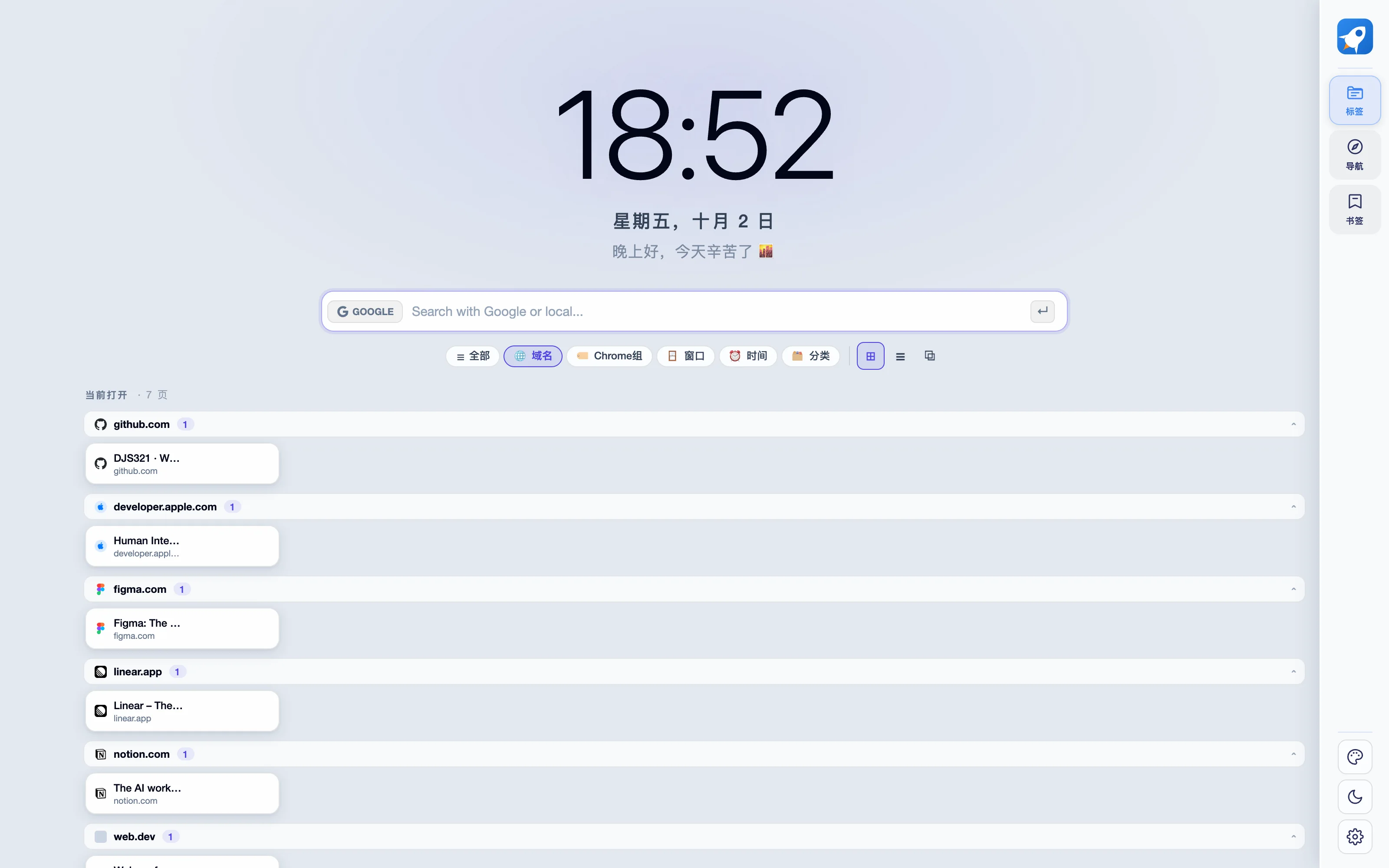
Real DJS321 Tabs interface with browser tabs organized by context
01Capture contextSearch · Group · Archive
LOCAL HANDOFF
DTDesign reference: weekly planning
Title · URL · Optional text No product server in between
DJS321 Inbox+1
Real DJS321 week view, where captured information becomes scheduled action
02Decide what to doClarify · Plan · Focus
  1. 01Capture in the browserDJS321 Tabs
  2. 02Gather in InboxInbox
  3. 03Plan your weekPlan
  4. 04Enter focusFocus
  5. 05Reflect and adjustReflect

Local first Core data stays on your device by default. For other devices, choose to sync to your own personal cloud storage.

One rhythm Plan on Mac, act on iPhone and think on iPad. Widgets and Dynamic Island help keep you focused.

02 / 04 DJS321 Tabs · Browser workspace

Not just managing tabs. Reclaiming attention.

Open tabs can become a second, unruly to-do list. DJS321 Tabs turns them into a searchable workspace with context, then sends what is worth keeping to DJS321.

Download preview ZIP
  1. 01
    Capture the clutter

    Find open and archived pages in one search box.

  2. 02
    Create context

    Group by domain, window, time or category, so every tab has a place.

  3. 03
    Turn it into action

    Send titles, links and page text to DJS321, rather than leaving useful material in the browser.

Real DJS321 Tabs new-tab interface with time, search, groups and multiple views
ACTUAL PRODUCT UI Real extension · Fictional demo data
01One search for everything

Search open tabs, archived history and bookmarks as you type.

02Six ways to group

Domain, Chrome group, window, time, category or all tabs.

03Three workspace views

Grid, list and board, to match the density of your work.

04Back to your task system

Send a web page to DJS321 Inbox in one step.

03 / PRINCIPLES Why we designed it this way
Time belongs to everyone. We build tools,
not habits you cannot break.

DJS321 does not decide for you or turn reminders into anxiety. It gives information, plans and actions a place, so you can see what matters this week.

  1. 01
    Local by default

    Core data is stored on your device first. Cross-device sync uses the personal cloud service you choose.

    LOCAL FIRST
  2. 02
    Restraint is a feature

    Every entry point should shorten the distance from wanting to do something to doing it, not add another demand on your attention.

    CALM BY DESIGN
  3. 03
    A week is the right scale

    Turn big ambitions into choices you can test in seven days. Carry what you learn into the next week.

    WEEK BY WEEK
DOWNLOAD · Available now

Give next week
back to yourself.

Now on the App Store for iPhone and iPad. Mac is awaiting review; DJS321 Tabs is a manual-install desktop browser preview. Availability varies by storefront.

DJS321 · v1.0 Available now · iPhone / iPad

Download on the App Store
01iPhone & iPadApp Store · One shared weekly planAvailable now Download on the App Store
02macOSMac App Store · Apple SiliconAwaiting review
03Android Coming soon
04Windows Coming soon
05 DJS321 Tabs Preview · Manual install

v1.1.1 · ZIP · 0.25 MB

Desktop Chrome / Edge only; not iOS or Safari.

Download preview ZIP
Installation & permissions
  1. Download and extract into a permanent folder. Keep it after installation.
  2. Open chrome://extensions/ or edge://extensions/ and enable Developer mode.
  3. Choose Load unpacked, select the folder containing manifest.json, then open a new tab.

Not store-reviewed; no automatic updates. Export data before replacing files in the same folder and reloading. Do not uninstall first. Managed browsers may block installation.

Settings → Navigation layout: Top, Sidebar, or Classic right with a centered large clock. Updates retain your choice; small windows use compact navigation.

Permissions support tabs/groups, bookmarks, storage, exports and notifications, not full history or global closed sessions. Text extraction uses activeTab / scripting on request; batch collection and custom HTTPS connections request revocable selected-site access. Installation replaces the new-tab page.

Archives stay local; some settings use browser sync. Quotes are off by default. Enabled quotes, online wallpaper/thumbnails can contact third parties; searches go to the chosen engine. App handoff needs first-time pairing approval in a compatible desktop App, then verifies its returned local port without scanning. Credentials are excluded from sync and backups. Site icons use the browser’s local cache without network requests.

The extension follows your browser language: English or Simplified Chinese. The website’s 16-language selector does not change the extension language.

SHA-256a904483e3e230e071e2214d442475b9bef87693582d8355f58c763ac66d7d35c